

DOWNLOAD THE CITY SUMMIT APP
NLC Has a New Event App!
Make the Most of Your City Summit Experience
Only registered City Summit attendees have access to the event app. An email notification will be sent out to attendees in early November with instructions on how to access the new app. In the meantime, previous NLC conference attendees should delete the old ‘NLC Conferences’ app from your mobile device.
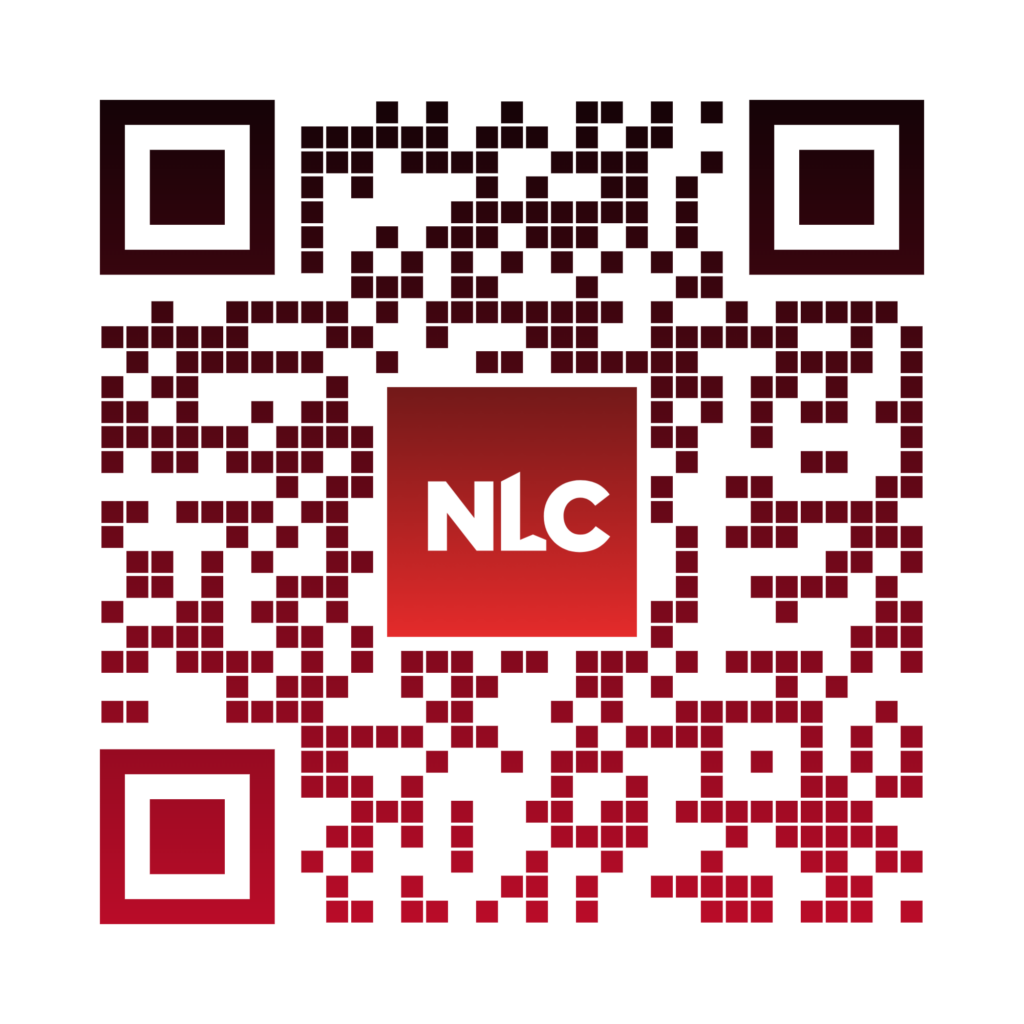
To download, search for ‘NLC Event’ in your app store or click/scan below to start personalizing your conference experience. When opening the app for the first time, be sure to click “Allow Notifications” to ensure you receive timely updates while on site. You can also adjust notifications in your app settings.

or scan the code below:

or scan the code below:
The official City Summit app has everything you need to plan for and navigate the conference, including the ability to:
- Build and manage your personalized City Summit agenda
- See your ticketed events preloaded in your My Schedule
- Quickly connect with and set meetings with other attendees
- Navigate the City Summit floor plans and maps
- Participate in the City Summit Quest
- Participate in the mobile photo booth
- Take notes in your mobile app and send them to yourself
- and more!
All NLC City Summit attendees will receive instructions for accessing the app before the conference. Please note that by accessing the app you agree to NLC’s Code of Conduct.
Ready To Get Started?
Troubleshooting & How-tos
Click on the arrows to access recommendations and screenshot guides based on your needs. Still have questions? Visit App Support at Ask NLC near Registration while you are on-site!
Logging In
I see the CCC app, not City Summit. What do I do?
Uninstall and re-download the app from your app store and try logging in again.
I’m trying to login, but I can’t find my credentials. How do I locate them?
Search the email account that is registered for City Summit for an email from Conferences@nlc.org.
The subject line is “Your Credentials Enclosed: Download the NLC City Summit App!“
Your unique username and password are enclosed in that email.
I checked my email but still can’t locate my credentials.
Email support@nlc.org or visit the Ask NLC desk near registration onsite at the conference.
I have my credentials but they aren’t working.
Uninstall and re-download the app, and try logging in again. If that doesn’t work, email support@nlc.org or visit the Ask NLC desk near registration onsite at the conference.
NOTIFICATIONS
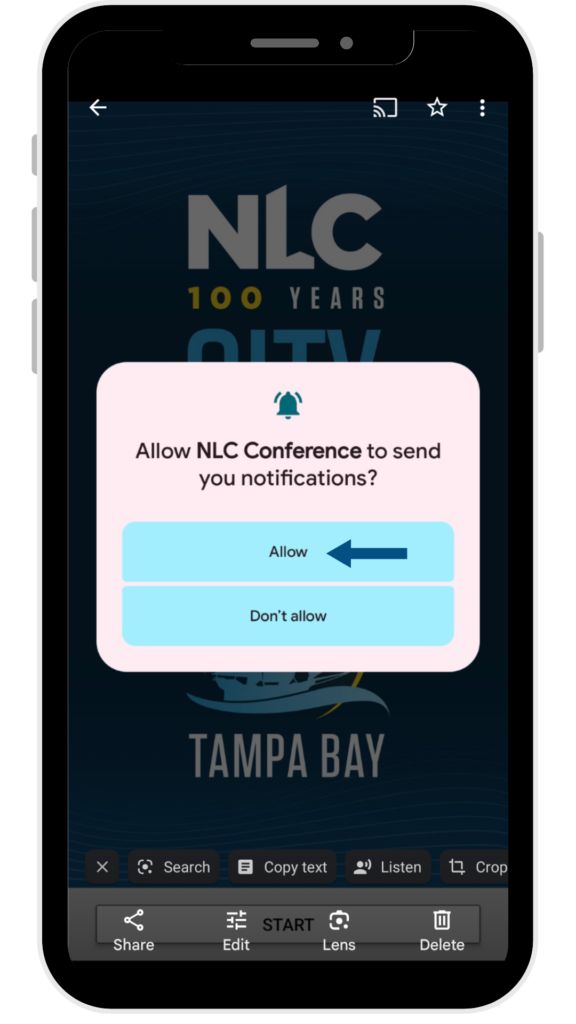
A window popped up the first time I opened the app asking about allowing notifications. What do I select?
Click “Allow Notifications.” This ensures you receive timely announcements during the conference straight to your home phone screen. All notifications may also be viewed from “View Notifications” at the top of the app menu.
I’m not getting push notifications from the conference app on my device’s home screen. How do I fix it?
Go to your app settings:
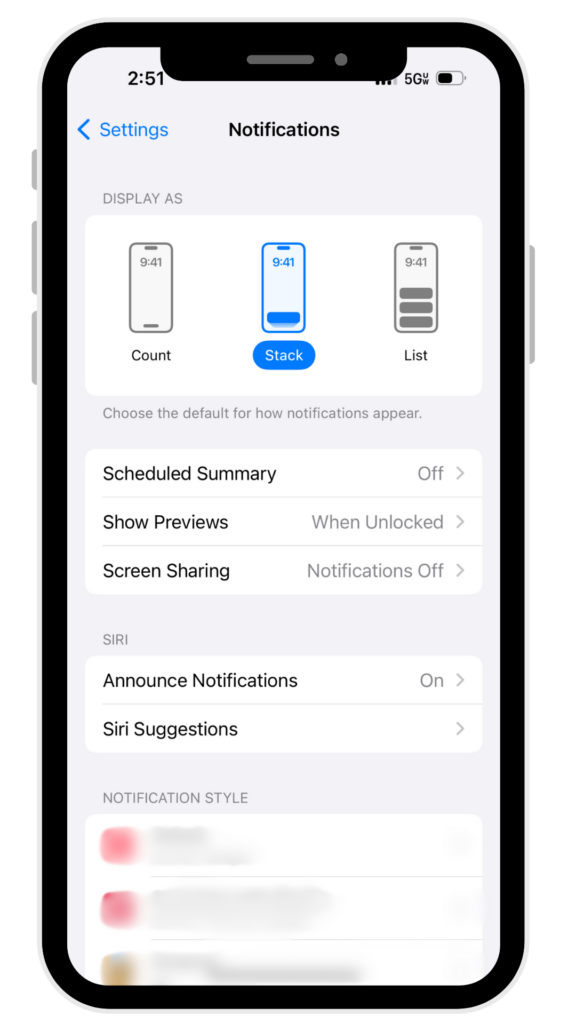
Apple (iOS): Exit the app and open your phone settings.
- Select Notifications in settings.
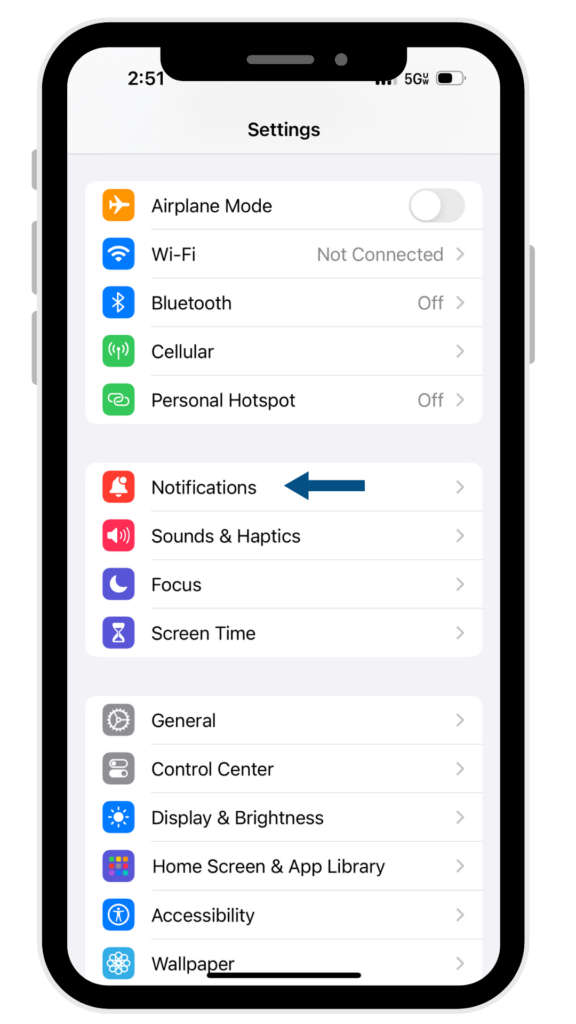
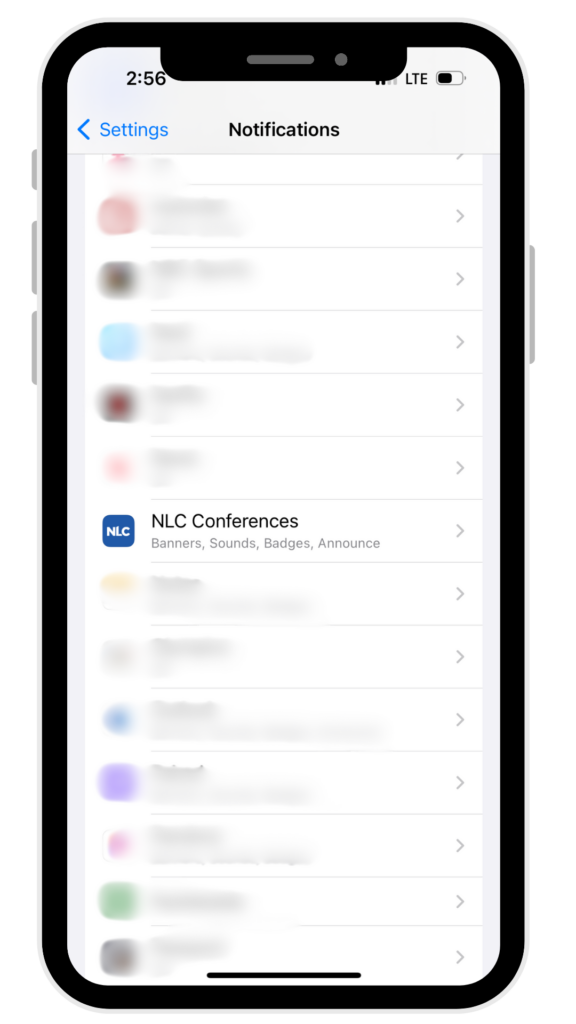
2. Scroll to NLC Conferences
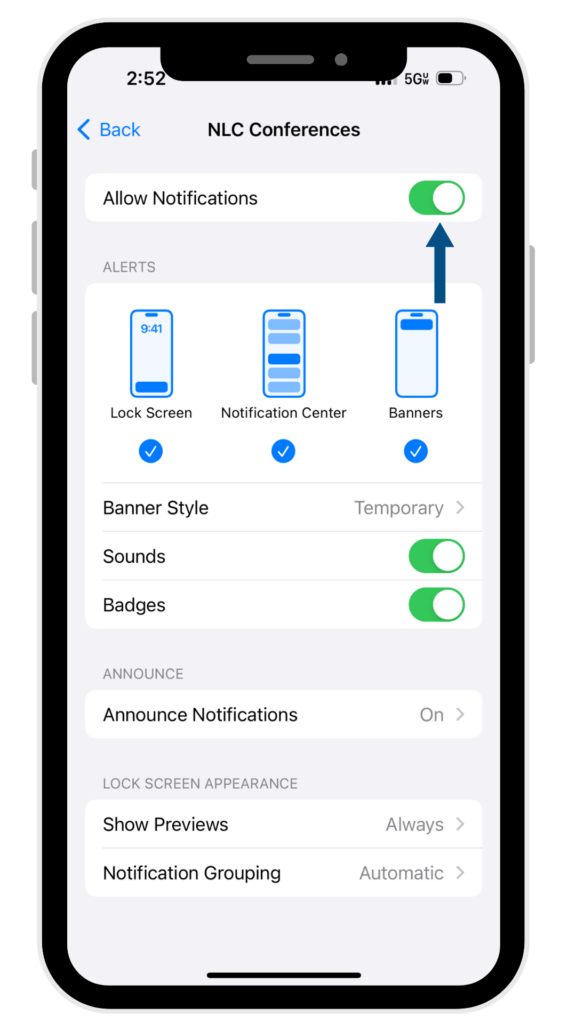
3. Tap the app listing
to open
4. Ensure “Allow Notifications” is on
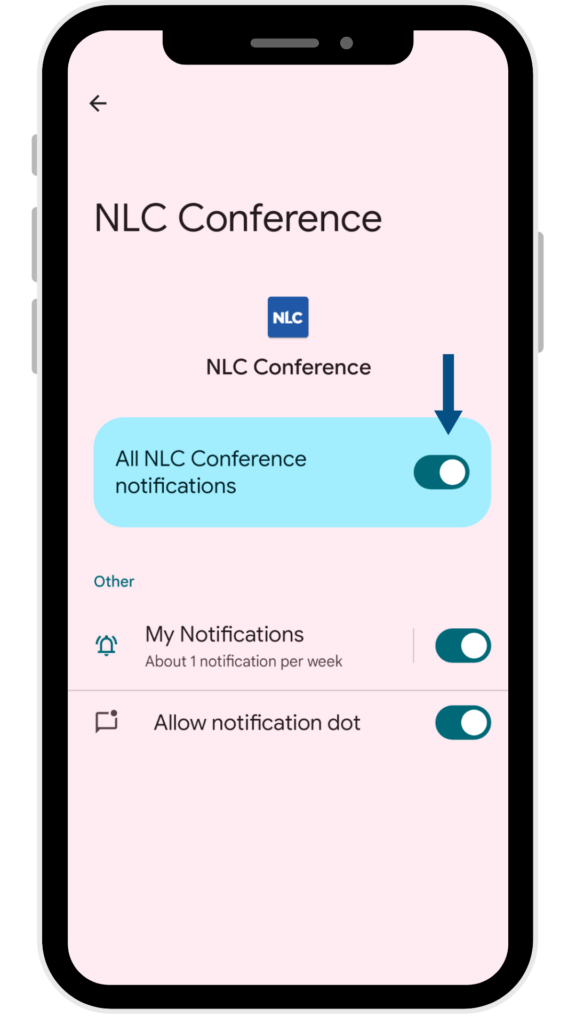
Android:
1. Exit the app and touch and hold the NLC Conferences app icon.
2. A window will pop up. Select App info.

3. Select Notifications

4. Turn on All NLC Notifications
Opening the app
I’m in! Do I need to log in every time I use the app?
No. Once you’ve logged in once, you can access the app and the most up-to-date conference information without needing to log in again.
I clicked Start and it says “downloading” and nothing is happening. Is that normal?
Yes, sometimes the app takes a while to load the first time you log in, up to a minute. After the first time you open the app, it should open instantly. If you consistently experience a lag when opening the app, visit Ask NLC near registration or email support@nlc.org.
Personalizing your Schedule
How do I bookmark my preferred sessions to a personalized schedule?
Select the event you wish to add to your schedule from the Agenda page. Click the Bookmark button and add any relevant notes you wish to make about the session using the Notes button.
For more information, follow our “Bookmarks and Notes” tutorial here.
adding and editing notes
How do I add session notes in the app?
Select the event you wish to add notes to from the Agenda page. Click the Notes button to add any relevant notes you wish to make.
For more information, follow our “Bookmarks and Notes” tutorial here.
How do I view/edit session notes I entered in the app?
You can access notes from My Notes in your Me page. You can also find them within bookmarked events in your My Sessions page.
Messaging in the app
How do I message other attendees?
Find the desired attendee you want to message in the Attendee page. Click the Message button to enter a chat room with the attendee.
For more information, follow our “Connecting With Other Attendees” tutorial here.
I want to message another attendee, but I can’t find them in the contact list.
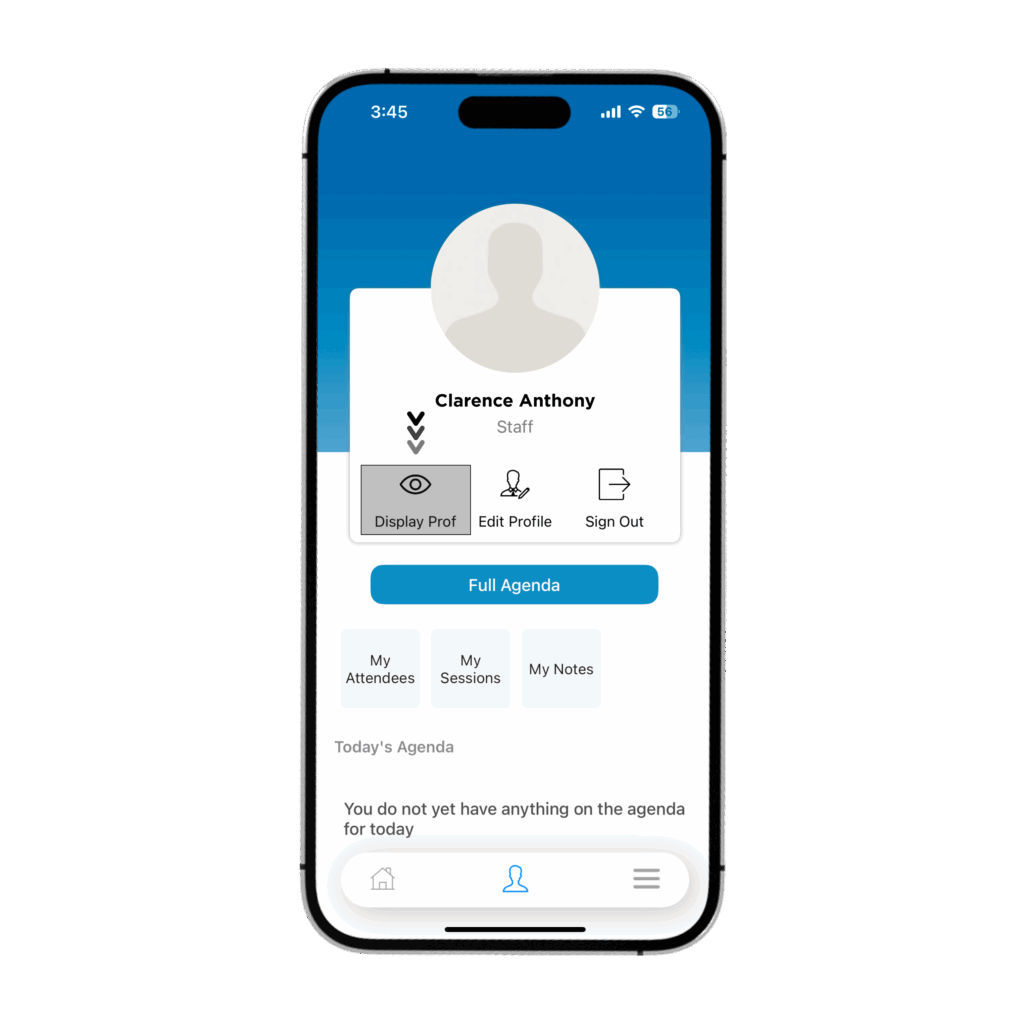
The attendee might not have their profile set to public. If you see them in person and they wish to change the setting, have them go to their Me page and click the Display Prof button.
Code of Conduct
National League of Cities (NLC): Conference & Event Code of Conduct and Waiver
The National League of Cities strives to be an advocate for cities, where diversity is critical to success. We believe that the diversity of our experiences, ideologies, backgrounds, and perspectives leads to innovation and creativity that drive our communities forward.
NLC is committed to creating a safe environment that is inclusive and free from discrimination, harassment or intimidation regardless of race, ethnicity, religion, sexual orientation, gender expression or identity, transgender status, age, disability, veteran or marital status, or any other protected categories under applicable law. The environment NLC creates provides a forum for the free expression and exchange of ideas that can ultimately lead to cross-sector solutions to the country’s most pressing issues.
This Event Code of Conduct is important for promoting and creating an inclusive, supportive, and collaborative environment for all participants at NLC events. All meeting participants – including attendees, speakers, volunteers, exhibitors, meeting staff, members of the media, vendors, and service providers (hereinafter “participants”) – are expected to abide by this Event Code of Conduct. This Event Code of Conduct applies to events and activities in any venue associated with the primary event, including official and ancillary events, and online events, forums, and discussions.
Expected Behavior
- Treat all participants with kindness, respect, and consideration, while valuing a diversity of respectful and considerate views and opinions (including those you may not share).
- Communicate openly, with respect for other participants, critiquing ideas rather than individuals.
- Refrain from behavior and speech that could be perceived as demeaning, discriminatory, or harassing.
- Be mindful of your surroundings and of your fellow participants. Alert NLC staff if you notice a dangerous situation or someone in distress.
- Respect the rules and policies of all meeting venues and related spaces.
Unacceptable Behavior
- Offensive or unwanted behavior or language related to race, ethnicity, religion, sexual orientation, gender expression or identity, age, disability, veteran or marital status, or any other protected categories under applicable law.
- Intimidation or bullying.
- Photography or video taken in a harassing manner.
- Sustained disruption of event presentations, or other official activities.
- Unwelcome or uninvited attention or contact.
- Actual or implied threat of physical harm.
- Physical assault, including unwelcome physical contact.
- Real or implied threat of professional, reputational, or financial damage or harm.
- Retaliation or threatened retaliation for reporting unacceptable behavior.
- Failure to follow any of the rules or regulations of the event or instructions of NLC staff.
- Recording of sessions (including audio, video, AI enhanced technology and photography) without express written permission.
- Any other illegal activity not already covered above.
Unacceptable behavior from any participant at NLC events will not be tolerated. This applies to all attendees, speakers, sponsors, exhibitors, contractors, volunteer leaders, vendors, venue staff and anyone with decision-making authority. If a participant is asked to curtail unacceptable behavior immediate compliance is expected. Repeated or serious violations of this policy will result in immediate removal from the conference without a refund. Reports of unacceptable behavior will be investigated, as described below.
Immediate Serious Threat to Public Safety
- Anyone experiencing or witnessing behavior that constitutes an immediate or serious threat to public safety should immediately contact local law enforcement (by calling 911) and notify facility security.
Reporting Unacceptable Behavior
- If no immediate danger is assessed, but there is the sense or experience of unacceptable behavior, the witness of such behavior, or other concerns, an NLC staff member or an NLC representative should be notified as soon as possible, who can work with the NLC senior leadership to resolve the situation. All reports will be treated seriously and responded to promptly.
- In addition to notifying someone in person, you can also report an incident to NLC via email to the NLC CEO & Executive Director, Clarence Anthony, at anthony@nlc.org and/or NLC Human Resources, at HR@nlc.org.
NLC reserves the right to take any action deemed necessary and appropriate, including immediate removal from the event without warning or refund, in response to any incident of alleged unacceptable behavior, and NLC reserves the right to prohibit attendance at any future NLC event. NLC also reserves the right to obtain information through a fair and balanced investigation process regarding any reported incidents and take any action deemed necessary and appropriate to address the situation.
Event Code of Conduct Acknowledgment
As part of the registration process for NLC convenings and events, all participants will be required to acknowledge that they have read, understand, and accept the provisions of the Event Code of Conduct.
If you are serving as a chaperone for any youth who are attending as part of your delegation, you are also acknowledging responsibility for their conduct and behavior throughout the duration of the conference.
For any questions about this policy, please send an email to conferences@nlc.org.